Wednesday, July 19, 2017

DBFS - Overview


Oracle Database File System (DBFS) creates a standard file system interface on top of files and directories that are stored in database tables. Oracle DBFS is similar to the Network File System (NFS) protocol in that it provides a shared network file system that looks like a local file system.
Similar to NFS, there is a server component and a client component. The server is Oracle Database and files are stored as SecureFile LOBs in a database table. Because the files are stored in the database you inherit the high availability and disaster-recovery protection Oracle Database offers, providing a full stack disaster-recovery solution. The implementation of the file system in the database is called the DBFS Content Store and allows each database user to create one or more file systems that can be mounted by clients. Each file system has its own dedicated tables that hold the file system content. A set of PL/SQL procedures implement file system access (such as CREATEOPENREADWRITE, and LIST DIRECTORY) to the database.
Oracle DBFS provides the following benefits:
  • The ability to store both non-structured and structured data in the same database.
This allows you to perform backups and synchronous point-in-time recovery of both types of data.
Oracle DBFS provides the ability to store unstructured content in the database by presenting an NFS-like file system to the client. The file system itself is stored in a tablespace in Oracle Database. The database storage aspect is transparent to the client because it appears as a traditional NFS mounted file system with the same functionality, but DBFS provides the ability to store any type of file directly in the database—such as logs or generated reports—that you would normally store in a file system.
  • Clustered file system capability with a lightweight process.
You can mount Oracle DBFS on multiple client machines (database servers, mid-tiers) and therefore the file system can also be available for use as a clustered file system. A lightweight process is started on each client machine to make the file system accessible. This process uses the FUSE (Filesystem in Userspace) API to implement the file system access.
  • Fast and transparent client failover of both file system and database operations (full stack disaster recovery).
The process on the client systems is OCI based. Thus, clients can take advantage of FAN and Fast Connection Failover capabilities using the same service-based connection methods.

Why a Database File System?

The Oracle Database has been commonly used to store files closely associated with database applications including CAD, medical images, invoice images, documents, etc. The SQL standard data type, BLOB (and CLOB) is used by applications to store files in the database. The Oracle Database provides much better security, availability, robustness, transactions, and scalability than traditional file systems. When files are stored in the database, they are backed up, synchronized to the disaster recovery site using Data Guard, and recovered along with the relational data in the database. This has made storing files in the database an appealing option for many applications.

In Oracle Database 11g, Oracle introduced Oracle SecureFiles LOBs. SecureFiles LOBs provide high performance storage for files, comparable to the performance of traditional file systems. SecureFiles LOBs support advanced features of compression, deduplication and encryption to files. Because SecureFiles LOBs maintain backward compatibility to BLOB (and CLOB), applications written against BLOBs continue to transparantly work against SecureFiles LOBs, even with the previously mentioned features.

Database File System (DBFS) leverages the features of the database to store files, and the strengths of the database in efficiently managing relational data, to implement a standard file system interface for files stored in the database. With this interface, storing files in the database is no longer limited to programs specifically written to use BLOB and CLOB programmatic interfaces. Files in the database can now be transparently accessed using any operating system (OS) program that acts on files. For example, ETL (Extract, Transform and Load) tools can transparently store staging files in the database.

What is the Oracle Database File System (DBFS)?

The Oracle Database File System (DBFS) creates a standard file system interface on top of files and directories that are stored in database tables. DBFS is similar to NFS in that it provides a shared network file system that looks like a local file system. Like NFS, there is a server component and a client component.
In DBFS, the server is the Oracle Database. Files are stored as SecureFiles LOBs in a database table. A set of PL/SQL procedures implement the file system access primitives such as create, open, read, write, and list directory. The implementation of the file system in the database is called the DBFS Content Store. The DBFS Content Store allows each database user to create one or more file systems that can be mounted by clients. Each file system has its own dedicated tables that hold the file system content.


Monday, January 2, 2017


As the year 2016 ends and 2017 spawns its the correct time for this post, for the Exadata Cell and DB Servers affected with this bug.

We all know or should know that the Second Leap will occur at 23:59:60 on December 31, 2016 UTC and many servers and applications can have some impact with this, but in this article I'll specifically talk about Leap Second for Exadata Database Machine.

For those who work with Exadata and are with Exadata storage and database servers in version 12.1.2.1.0 with the default package ntp-4.2.6p5-1.el6 will have a job before the turn of the year 2017, otherwise cellsrv processes on all Exadata storage servers and Database Servers may restart simultaneously when a leap Second time adjustment occurs.

What is a "leap second"?

A "leap second" is a world wide time adjustment by inserting or deleting one whole second to keep UTC (Universal Time, Coordinated) close to the mean solar time.

List of leap second time adjustments:

at 23:59:60 on December 31, 2016 UTC
at 23:59:60 on June 30, 2015 UTC


SYMPTOMS:

Without the updated ntp package cellsrv processes on all storage servers may restart simultaneously when leap second time adjustment happens (e.g. on December 31, 2016). When this issue is encountered the following messages occur in the cell alert.log:

Cellsrv will have to be restarted, since backward drift in time was more than 300 milliseconds.

ORA-600: internal error code, arguments: [ossmisc:ossmisc_timer_ticks] 

Version affected by BUG Leap Second: Exadata Software Version 12.1.2.1.0 with the default package ntp-4.2.6p5-1.el6

No other Exadata versions are affected.


How to check the version of my Exadata software version? Below I show an example of how to check the version of Exadata Software. (Note: This version below is not affected by Bug Leap Second)

[root@hostname]# imageinfo -ver

12.1.2.3.2.160721


SOLUTION:

Recommended Action - Upgrade to 12.1.2.1.1 (or higher)

The recommended action is to upgrade to Exadata Storage Server software version 12.1.2.1.1 (or higher).

OR

Alternative Action - Update NTP Packages on Exadata Storage and Database Servers

Alternatively, install updated package ntp-4.2.6p5-2.0.1.el6_6 on Exadata storage and database servers.

Perform the following steps to update NTP:

Step 1 - Enable ntpdate Service

Step 2 - Verify Installed Exadata and NTP Package Version

Step 3 - Verify Current NTP Time Offset

Step 4 - Obtain and Stage Updated NTP Packages

Step 5 - Install New NTP Packages

Step 6 - Verify Installed NTP Version


More details Doc ID 1986986.1


Reference Note: Leap Second Time Adjustment and Its Impact on Exadata Database Machine (Doc ID 1986986.1)

Happy New Year and a great 2017 to all.

Wednesday, August 31, 2016

Exafusion

Exafusion allows database processes to read and send Oracle RAC messages directly over the Infiniband network bypassing the overhead of entering the OS kernel, and running the normal networking software stack.


Benefits
  • Lower latency
  • Improve response time
  • Higher throughput direct to wire block transfers between Oracle Real Application Clusters (Oracle RAC) instances
  • Reduced CPU utilization and better scale-out performance
  • Exafusion is especially useful for OLTP applications because per message overhead is particularly apparent in small OLTP messages. It helps small messages by bypassing OS network layer overhead. 

Parameter
  • EXAFUSION_ENABLED parameter is used to enable or disable the Exafusion accelerate cache fusion protocol feature, which is available on the Linux operating system of Oracle Exadata Database Machine only.
  • Exafusion is disabled by default.
  • To enable Exafusion, set the EXAFUSION_ENABLED initialization parameter to 1. To disable Exafusion, set the EXAFUSION_ENABLED initialization parameter to 0.
  • This parameter cannot be set dynamically. It must be set before instance startup.

Prerequisites and Limitations
  • Oracle Storage Server Software release 12.1.2.1.1 or later is required.
  • Mellanox ConnectX-2 and ConnectX-3 Host Channel Adapters (HCAs) are required.
  • Oracle Unbreakable Enterprise Kernel 2 Quarterly Update 5 (UEK2QU5) kernels (2.6.39-400.2nn) or later are required.
  • The Exafusion feature does not support mixed mode operation on an Oracle RAC cluster. Either all the instances in an Oracle RAC cluster must have the feature enabled or none.
  • Rolling upgrades of a non-Exafusion enabled Oracle RAC cluster to Exafusion are not supported.
  • Exafusion is available only on the Linux operating system of Oracle Exadata Database Machine
  • It is not supported on any non-engineered system or SPARC Super Cluster (SSC). If you set the EXAFUSION_ENABLED parameter on a non-supported platform, then the instance will be prevented from starting up, and an ORA-00439: The specified feature is not enabled: string error message is generated.
  • This initialization parameter is available starting with Oracle Database 12c Release 1 (12.1.0.2) Bundle Patch 11 (BP11).
 Source: https://docs.oracle.com

Wednesday, July 20, 2016

ASM Datafile Move

Move ASM database files from one diskgroup to another

In the past, I have been involved in a migration of a standalone database to RAC with ASM through data pump export and import.  After the migration was done, one of the ASM diskgroup is more than 98% percent used, which triggerred alerts from BMC Patrol, which is a standard monitoring tool in my working environment. 
Searching My Oracle Support website, I found the following note:

How to move ASM database files from one diskgroup to another ? (Doc ID 330103.1)


The note is pretty straight forword, however, there was a one suprise when I tried to offline a datafile :

ORA-01145: offline immediate disallowed unless media recovery enabled

That was because I put the db in noarchivelog mode in order to speed up the data pump import jobs. After I configured the archivelog mode, thing went fine.

Here are the steps I followed for future reference

1) Identify the data file to be moved

+DATA_01/roeprdsc/datafile/non_ttq_clb_msg_01.dbf            NON_TTQ_CLB_MSG
2)  Identify the diskgroup on to which the file has to be moved.

+DATA_09/roeprdsc/datafile

3) Take the file offline.

 ALTER DATABASE DATAFILE '+DATA_01/roeprdsc/datafile/non_ttq_clb_msg_01.dbf' OFFLINE;

4. Copy the data file

I used DBMS_FILE_TRANSFER package. We can also use RMAN, detail see the note.
   
         
create or replace directory orcl1 as '+DATA_01/roeprdsc/datafile';
       
create or replace directory orcl2 as '+DATA_09/roeprdsc/datafile';
    
 Note, if need to create a directory in a diskgroup, syntax looks like


 ASM> Alter disgroup asmdsk2 add directory  '+asmdsk2/test';       
      
BEGIN
 DBMS_FILE_TRANSFER.COPY_FILE(
 source_directory_object => 'ORCL1',
 source_file_name => 'non_ttq_clb_msg_01.dbf',
 destination_directory_object => 'ORCL2',
 destination_file_name => 'non_ttq_clb_msg_01.dbf');
END;                         
/


5) Rename the file to point to new location.

ALTER DATABASE RENAME FILE '+DATA_01/roeprdsc/datafile/non_ttq_clb_msg_01.dbf' TO
 '+DATA_09/roeprdsc/datafile/non_ttq_clb_msg_01.dbf' ;


6) Recover the file.

  RECOVER DATAFILE '+DATA_09/roeprdsc/datafile/non_ttq_clb_msg_01.dbf'

7) Bring the file online.


 ALTER DATABASE DATAFILE '+DATA_09/roeprdsc/datafile/non_ttq_clb_msg_01.dbf' online;


8) Verify the new file location.
        
SQL> SELECT FILE_NAME FROM DBA_DATA_FILES where file_name like '%clb_msg%';

FILE_NAME
--------------------------------------------------------------------------------
...
+DATA_09/roeprdsc/datafile/non_ttq_clb_msg_01.dbf
+DATA_01/roeprdsc/datafile/non_ttq_clb_msg_02.dbf
+DATA_01/roeprdsc/datafile/non_ttq_clb_msg_03.dbf
+DATA_01/roeprdsc/datafile/non_ttq_clb_msg_04.dbf
+DATA_01/roeprdsc/datafile/non_ttq_clb_msg_05.dbf

..


9) Delete the file from its original location either per SQLPLUS or per ASMCMD:

Syntax examples:

SQL:ASM> ALTER DISKGROUP ASMDSK2 DROP FILE users.256.565313879;

or:   ASMCMD> rm -rf  

Note:
Most Automatic Storage Management files do not need to be manually deleted because, as Oracle managed files, they are removed automatically when they are no longer needed. ( To not to have the alert come again, I have to do this)

Database Migration

Data Pump Export and Import for Database Migration

Sometime back we had to carry out a test for using Data Pump Export and Import utilities to migrate a 17 TB database from Solaris to Linux platform, also from single-instance, conventional file system to a two-node RAC on ASM. During the exercise I have learned and become more familiar with quite a few interesting features or options of Data Pump Export and Import utilites and encountered a few difficulties as well.

The first obstacle I met was that I was unable to do Data Pump Export to the NFS storage. We have the NFS storage that is shared between the Solaris and Linux server. At first I tried to perform Data Pump Export to the NFS storage directly. Unfortunately, the job was just stuck there for long time. Having researched this issue for a while and tried the options mentioned in a MOS note (See References [1]) with the help of a SA, I just could not get this worked out. Finally we decided to export to the local file system first then move the dump files to the NFS. I was able to move about 150 GB dump file per hour. Fortunately, the Data Pump Import from NFS storage did not pose any problems.

Table mode Data Pump Export and Import were used in the test. Large tables were typically exported or imported individually and smaller tables were grouped together into several batches. For each large table or a group of smaller tables, I prepared the corresponding parameter files with parallel option if appropriate. In the Import job, I always excluded the index, constraint and statistics. I used SQLFILE option of the impdp command to extract the DDL commands related to the tables, including create table, index and constraint statements etc. Those DDLs were executed after the Import with parallel option for index creation and "ENABLE NOVALIDATE" for constraints typically. Therefore the database migration actually consisted of multiple tables migration jobs. For each tables migration, I performed and recorded the timing of the following steps: export, move dump file to NFS, import, DDLs for index etc. Those tables migration jobs were overlapped as two or three of them were executed at the same time and could be in different steps.

Shortly after the onset of the test I found out that Data Pump Export was extremely slow on a big table with lob column. The  export job was unable to run in parallel regardless of the parallel setting. The segment sizes of this big table are 237 GB and 382 GB for table and lob respectively. The table uses a sequence-based PK column called "EMAIL_SEQ_ID". To speed up the export, I started 23 export jobs at the same time, each job exported a particular range of rows based on the PK. The key is to use the QUERY option for the expdp command. The QUERY option contains a WHERE clause that specifies the PK range. Finally I was able to export this table in 30 hours, move the 420 GB dump files in 2 hours, import in about 15 hours and execute DDL for indexes etc in 2 hours. It is worth noting that although we can perform the lob table export job in parallel by such an approach, we cannot do the same for import. The import job will hold a TM lock for the table, so only one import job can run at a time. I used this approach for several big lob tables. Appendix showed example Shell script to prepare expdp or impdp parfile. By the way, later I found that unable to export in parallel for lob table is a known issue in the Oracle community. (see Reference [3]). A blog post suggested using rowid based approach to separate the rows of lob tables. (see Reference [4])

Occasionally I made mistakes and needed to terminate an export or import job. I found it very convenient to use KILL_JOB command in the interactive mode. First, I need to know the job name either from log file or from dba_datapump_jobs view. Then I can enter the interactive mode using attach option:

expdp / attach=[job_name]

Then I issued "KILL_JOB" command. Note when using KILL_JOB to the expdb, all dump files will be wiped out.

During the test, I have also learned that Data Pump Import can be done through db link. When specifying a source database link for the NETWORK_LINK option of impdp command, import job will retrieve data from the db link, and write the data directly to the target database There are no dump files involved.

I have mentioned previously SQLFILE option can be used to extract DDLs. But this option only available for impdp. Suppose I have a table in a database and I want to extract DDLs related to this table including indexes, constraints, object grants, comments, triggers etc associated with it, how should I do? Previously I always use DBMS_METADATA package for such tasks. If we create a db link to the database itself, we can use impdp with NETWORK_LINK and SQLFILE options to accomplish it very neatly.

Using export/import to migrate the database has one advantage over Transportable Tablespace approach at least: it allows the re-organization of tables and indexes. i.e. it is easy to move tables and indexes to different tablespaces if desired.

I completed the 17 TB database migration with the size of about 12 TB in the target database in about a month. The test was interrupted by other tasks with higher priority. I did total 17 tables migrations to complete the whole database migration. Ordered by end-to-end time (including export, move to NFS, import, DDL steps), they were refered to as as batch 1 to 17 here:

batch   time (hours) 
-----   ----------- 
1        50
2        30
3        25
4        24
5        21
6        16
7        15
8        14
9        11
10       10
11       10
12       9.5
13       5.5
14       5
15       3.5
16       3
17       3
------------


Based on above timing, if I perform the migration task as continuely as possible, I may be able to compete it in 5-7 days. The ultimate goal is to do a zero-down time migration. We plan to use oracle Golden Gate to caputure the changes at source during the database migration. So my next task will be investiagating whether this is possible in practise in our environment.

References:
[1] 781349.1 - ORA-27054: NFS file system where the file is created or resides is not mounted with correct options [ID 781349.1])
[2] Sample Export and Import parameter files:
 -- expdp.par  ----


 DIRECTORY=dpump_dir3
 DUMPFILE=dpump_dir3:email%U_q2.dmp
 TABLES=TTQ_GMPX.TTQ_EMAIL_EVENT_DETAILS
 LOGFILE=dpump_dir3:TTQ_EMAIL_EVENT_DETAILS_q2.log
 #PARALLEL=20
 FILESIZE=5G
 JOB_NAME=exp_email_q2
 QUERY="WHERE email_seq_id >=2*200000000   and email_seq_id < 3*200000000"


  -- impdp.par ----

 DIRECTORY=dpump_dir
 DUMPFILE=dpump_dir:email%U_q2.dmp
 TABLES=TTQ_GMPX.TTQ_EMAIL_EVENT_DETAILS
 TABLE_EXISTS_ACTION=APPEND
 LOGFILE=dpump_dir:TTQ_EMAIL_EVENT_DETAILS_q2_imp.log
 PARALLEL=2
 JOB_NAME=imp_email_q2
 EXCLUDE=index,constraint,statistics
 #EXCLUDE=statistics
 transform=storage:n,oid:n
 CLUSTER=NO

[3] Bug 5599947 - Export Data Pump is slow when table has a LOB column - Defect: Bug:5599947 "DATAPUMP EXPORT VERY SLOW"

[4] http://jensenmo.blogspot.com/2012/10/optimising-data-pump-export-and-import.html

[5] Some other references:
Master Note for Data Pump [ID 1264715.1]
Checklist For Slow Performance Of DataPump Export (expdp) And Import (impdp) [ID 453895.1]
Parallel Capabilities of Oracle Data Pump [ID 365459.1]


Appendix - sample shell script to generate expdp/impdp par file for big lob table

#!/bin/ksh
i=21
while [[ $i -le 43 ]];do
 
  ((j=i+1))
  PARFILE="EMAIL_CONTENT_q$i.par"
  echo "DIRECTORY=dpump_dir3" > $PARFILE 
  echo "DUMPFILE=dpump_dir3:ecntnt_q${i}_%U.dmp" >> $PARFILE 
  echo "TABLES=TTQ_GMPX.EMAIL_CONTENT" >> $PARFILE
  echo "LOGFILE=dpump_dir3:EMAIL_CONTENT_q$i.log" >> $PARFILE 
  echo "FILESIZE=10G" >> $PARFILE
  echo "JOB_NAME=exp_ecntnt_q$i" >> $PARFILE
  echo "QUERY=\"WHERE email_seq_id > $i * 2000000  and email_seq_id <= $j * 2000000\"">> $PARFILE
 
 
  echo "i=$i"
  echo "j=$j"
  ((i=i+1))
done

--- sample script to generate impdp par file for big lob table -----------------

i=6
while [[ $i -le 43 ]];do
 
  ((j=i+1))
  PARFILE="EMAIL_CONTENT_imp_q$i.par"
  echo "DIRECTORY=dpump_dir" > $PARFILE 
  echo "DUMPFILE=ecntnt_q${i}_%U.dmp" >> $PARFILE 
  echo "TABLES=TTQ_GMPX.EMAIL_CONTENT" >> $PARFILE
  echo "TABLE_EXISTS_ACTION=APPEND" >> $PARFILE
  echo "LOGFILE=EMAIL_CONTENT_q${i}_imp.log" >> $PARFILE 
  echo "JOB_NAME=imp_ecntnt_q${i}" >> $PARFILE
  echo "#EXCLUDE=index,constraint,statistics" >> $PARFILE
  echo "EXCLUDE=statistics" >> $PARFILE 
  echo "transform=storage:n,oid:n" >> $PARFILE
  echo "CLUSTER=NO" >> $PARFILE
 
 
  echo "i=$i"
  echo "j=$j"
  ((i=i+1))
done

Using Rowid


Update selected rows of a large table through rowid


We have a requirement to update a date column of about 14M rows in a large table of billions of rows .  The challenge is we have limited downtime to perform such a task.
In a Sun SPARC T4-2 machine with 128 virtual CPUs, we tested two different join methods with parallel executions:

-- nested loop took about 8h30
UPDATE TTQ_DQG.DQG_PRODUCT b
    SET billing_end_date = SYSDATE
    where exists (select /*+ parallel (a 12) */ 1 from DBSCRUB.ISOC_MAPPING_5M a where b.bo_id=a.old_bo_id);

-- hash join took about 5h
UPDATE /*+ parallel (b 12) */TTQ_DQG.DQG_PRODUCT b
    SET billing_end_date = SYSDATE
    where exists (select 1 from DBSCRUB.ISOC_MAPPING_5M a where b.bo_id=a.old_bo_id)
   ;

The 5h execution time still does not meet our downtime requirement. I proposed to perform the task in two steps.

(1) create a rowid driver table outside downtime window
(2) update the table with rowid in the downtime window

The test in the same machine shows we can do it in 41 min!
SQL>
SQL> --Step 1. Create a rowid driver table  several hours before downtime
SQL>
SQL> CREATE table  dbscrub.dqg_product_5m_rowid nologging
  2              AS
  3              select /*+ full(a) parallel( a 10) */ a.rowid rid from  TTQ_DQG.dqg_product a
  4              where exists ( select 1 from dbscrub.ISOC_MAPPING_5M b where a.bo_id=b.old_bo_id);
Table created.
Elapsed: 00:22:01.71
SQL>
SQL>
SQL>
SQL>
SQL> --Step 2 update table with rowid access in the downtime window
SQL>
SQL>
SQL> UPDATE  TTQ_DQG.CPF_PRODUCT b
  2  SET billing_end_date = SYSDATE
  3  where b.rowid in  (select /*+ parallel (a, 12) */  rid from DBSCRUB.dqg_product_5m_rowid a)
  4  ;
14431117 rows updated.
Elapsed: 00:41:34.28
SQL>
SQL>
SQL> spool off

Is this approach safe, any concerns? You may check this AskTom thread:
http://asktom.oracle.com/pls/asktom/f?p=100:11:0::::P11_QUESTION_ID:53140678334596

Oracle Exadata Deployment Assistance (OEDA)

Steps to Generate Exadata One Command Configuration sheet

First download  Oracle Exadata Deployment Assistance from below link as per your respective Operating System.


Install it on your machine and click on config to open deployment assistance.

Below are the detailed steps to fill the configuration details.

Click to enlarge.....


Provide organization name, application details, timezone with NTP and DNS Server details.


Select appropriate Exadata Configuration Rack, in our case it's Half Rack High Performance.


Provide network details for Administration and Client connectivity. You should have separate network for admin and client as per best practice.


Provide starting IP for admin network. Here in modify tab you can modify hostname if required.


Provide starting IP for client network, here also you can modify client hostname if required.


Infiniband network is private inter connectivity between server and storage so you can keep default IPs.


If you have seperate backup network then you can provide details for backup network.


Select Operating system from Linux/Solaris. X4 comes with only Linux as of now.


It will give overview of all the details which you have provided.


Define cluster name and components which will be the part of cluster.


Provide Oracle User, Group, Oracle Version and  Oracle Home related details. Also you have to mention ASM disk group name and storage allocation.


It will give the overview of cluster details.


Optional


Optional


Optional: ASR details


Optional


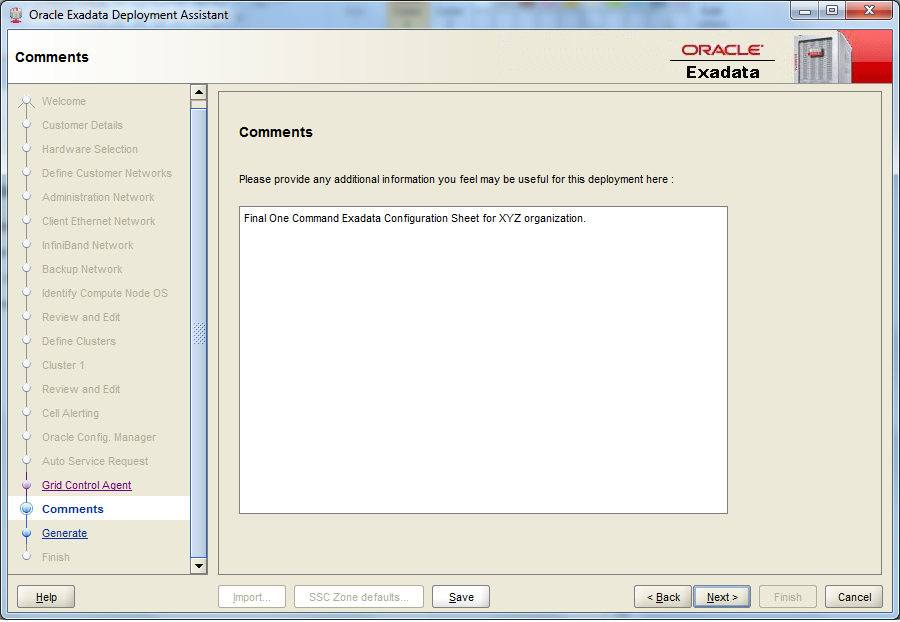
Comments is optional 


Generate the configuration sheet by saving the details to one folder.


It will generate below files after finishing the configuration sheet. Provide these details to Oracle to configure your Exadata. Get these files for reference HERE